TRT Channel Frequency TP 2026 Turksat New Today
Last Updated: Loading…
Home Satellites TV Channels Receiver Software Biss Keys Dish Setting Contact
Daily Updated Frequencies

Complete Satellite
Frequency Guide

The most comprehensive satellite TV channel frequency database for Pakistan and worldwide. Find transponder details, dish settings, receiver software, and Biss keys — all in one place.

Live Frequency Data
PTV Sports 11785 H 27500 KU
Geo News 11900 V 27500 KU
ARY Digital 11785 H 27500 KU
Hum TV 3965 H 4333 C
Express News 11919 V 27500 KU

TRT TV Channel

TRT Frequency

TRT Frequency TP

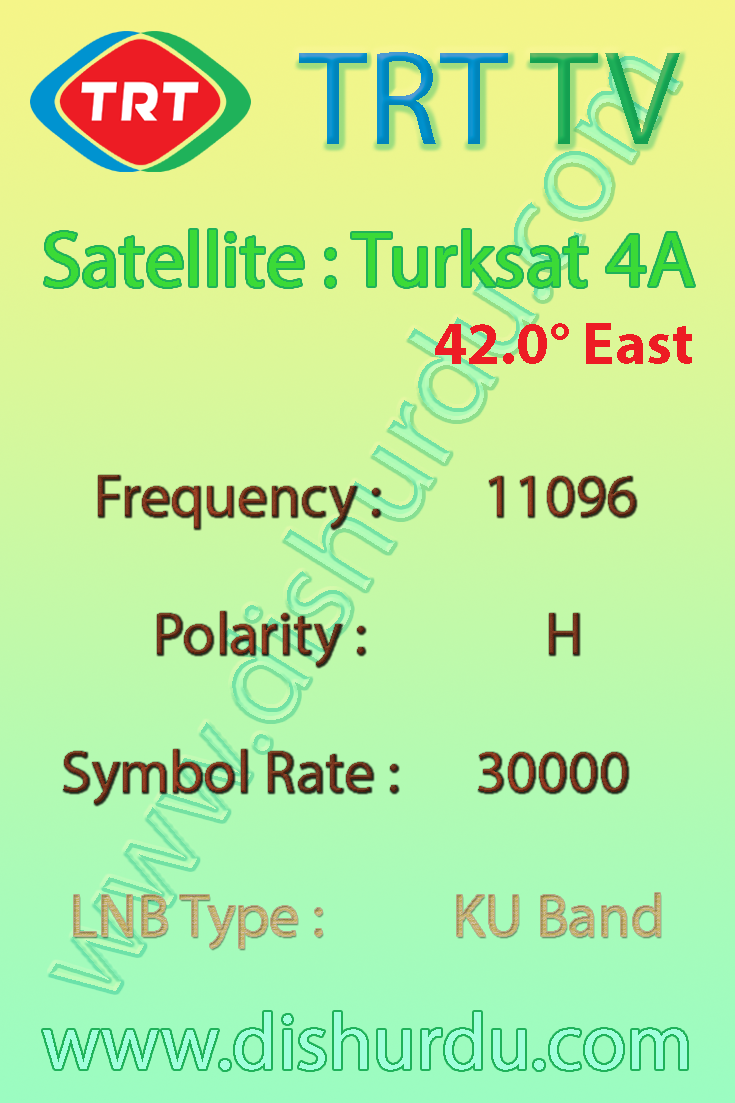
TRT Turksat Satellite 42.0° East

TRT HD TV Channel Fre To Air

TRT Frequency on Turksat

TRT TV channels Frequency TP list last Updated 08-07-2026 LNB Type KU Band
Channel Name Frequency
Polarity
SR-FEC SID-VPID System
Encryption
APID Language.
TRT 11958 V

27500

5/6

- DVB-S 1070-40301
6.5 
TRT 1 11958 V

27500

5/6

10500 1500   1100% Tur
TRT Haber 11958 V

27500

5/6

10501 1501   1601 Tur
TRT Türk 11958 V

27500

5/6

10502 1502   1602 Tur
TRT Spor (Mon-Wed 19-14 & Thu-Sun) 11958 V

27500

5/6

10503 1503   1603 Tur
TBMM TV (Mon-Wed 14-19) 11958 V

27500

5/6

10503 1503   1603 Tur
TRT Çocuk 11958 V

27500

5/6

10504 1504   1604 Tur
TRT Belgesel 11958 V

27500

5/6

10505 1505   1605 Tur
1705 Eng
TRT Okul 11958 V

27500

5/6

10506 1506   1606 Tur
TRT Müzik 11958 V

27500

5/6

10507 1507   1607 Tur
Diyanet TV 11958 V

27500

5/6

10525 1525 MPEG-4/HD 1625 Tur
TRT Radyo 1 11958 V

27500

5/6

10508   1608 Tur
TRT Radyo 3 11958 V

27500

5/6

10509   1609 Tur
TRT GAP Diyarbakir Radyosu 11958 V

27500

5/6

10510   1610 Tur
TRT FM 11958 V

27500

5/6

10511   1611 Tur
TRT Radyo Haber 11958 V

27500

5/6

10512   1612 Tur
TRT Radyo 6 11958 V

27500

5/6

10513   1613 Kur
Voice of Turkey World 11958 V

27500

5/6

10514   1614 
TSR 11958 V

27500

5/6

10515   1615 Tur
Meteorolojinin Sesi Radyosu 11958 V

27500

5/6

10516   1616 Tur
Voice of Turkey West 11958 V

27500

5/6

10517   1617 
TRT Nagme 11958 V

27500

5/6

10519   1619 Tur
TRT Memleketim FM 11958 V

27500

5/6

10520   1620 Tur
TRT Türkü 11958 V

27500

5/6

10521   1621 Tur
Voice of Turkey East 11958 V

27500

5/6

10523   1623 

TRT TV channels Frequency TP list last Updated 08-07-2026 LNB Type KU Band

trt-frequency

TRT TV channels Frequency TP list last Updated 08-07-2026 LNB Type KU Band

Strong TP Frequencies Strong TP All Satellite list KU Band LNB

G Sat 15 DD Free Dish TV Channels list

ST 2 Satellite Frequencies Strong TP TV Channels list

Apstar 7 Satellite 76.5° Easst Frequencies and TV Channels list details

Paksat 38.0° paksat-1r East Pakistani TV Channels Frequencies List Strong TP

Asiasat 7 Satellite 105.5° East TV Channel List Indian and Pakistani News TV Channels Frequency Stong TP

Apstar 7 Satellite 76.5° East TV Channels list Strong TP Frequencies

YahSat Satellite 52.5° East KU Band LNB SD and HD free TV channels details Strong TP Frequency


>

TRT TV on turksat-4A Strong TP KU Band

TRT TV Channel Turksat 4A KU Band LNB strong TP Frequency


UBN NBC Fox Action Movies Exitosa TV Discovery Family CBS sports 9 Kanal Talk Sport Kinozal 1 Ororo TV Pak News Senal ACN Space Toon Plus Teleonce com Tig sports Tippmix Elo 1 TLC Africa WACY TV Weather WENY TV WIWN TV WUNF TV Yes Movies Action YTN Live Aljazeera Bally sports Bounce Cozi TV Cuba Max TV Grit KSFY TV KTRK Mathrubhumi News NBC sports NBCSN Newsy NTV Animal Planet FS1 Game show Network HLN NBA TV Pac 12 Networks Playboy Tv Europe RT Arabic Shop LC TBN Asia Tennis Channel TUDN Dos TVN 24 WBRZ TV WDTV TV WEAU TV WNDU TV Yes Network Babestation Canal CVV CCTV 13 CineStar TV Premiere 1 CRTV Didgah TV Digea DW Arabia Evrokom Gol TV Hir TV IBC Tamil TV Kurdistan 24 KurdMax Show M-Plus Liga Al Salam TV Daystar TV Kapamilya channel Love Nature Macau Lotus Mezzo Live HD Moi et cie Nastoyashcheye vremya Novelas TV Prime Asia TV Shabelle TV Space Toon Arabic TNT sports TVA sherbrooke Zee Keralam Alforat TV AniPlus HD ARTE Francais Astra 1M

Trt Setup Guide

Featured snippet answer: Trt is a DishUrdu reference page for satellite TV users who need clear channel frequency guidance, receiver tuning help, dish setting notes and quick setup reminders. Use the available table data with your receiver menu and verify the active signal before saving channels.

Table of Contents

Quick Setup Guide

This page is written in a simple, user-friendly style for dish antenna and STB users. When you tune a satellite channel, open the installation menu on your receiver, choose the correct satellite name or orbital position, set the correct LNB type, and then enter the channel frequency details carefully. The most important values for a normal user are channel name, frequency, polarity and symbol rate.

For Ku Band receivers, many users select Universal LNB settings such as 9750/10600. For C Band, many setups use 5150, but the correct value depends on your LNB. If the signal quality is low, check dish direction, LNB skew, cable connector, DiSEqC port and weather condition before changing the saved channel list.

Required Frequency Table Format

When this page is updated with fresh frequency data, the technical table should stay clean and easy to read. Use only these columns: Channel, Frequency, Polarity and Symbol Rate. Extra technical fields should not be added unless they are specifically required later.

ChannelFrequencyPolaritySymbol Rate
TrtUpdate after manual verificationH / VUpdate after manual verification

Signal and Receiver Help

If a frequency does not scan, do not assume the page is wrong immediately. Satellite channels can move to a new transponder, change symbol rate, become encrypted, or stop temporarily. Run a manual scan first, then try blind scan if the receiver supports it. Keep the dish antenna stable and move it slowly while watching signal quality, not only signal strength.

Before publishing, verify all frequencies manually because satellite channel data can change.

Trt FAQ

How do I tune this channel or satellite page?

Open your STB installation menu, choose the satellite, enter frequency, polarity and symbol rate, then run manual scan. Save the result only after the receiver locks the signal.

Why is my receiver showing no signal?

No signal can happen because of wrong LNB settings, weak dish alignment, damaged cable, wrong DiSEqC port, rain fade, or an old frequency entry.

Can frequency data change later?

Yes. Satellite TV data changes often, so always verify the latest working frequency manually before publishing or updating a final table.

Which table columns should be used?

Use only Channel, Frequency, Polarity and Symbol Rate for clean user-friendly frequency tables.

Image Placement Suggestion

Add one receiver screenshot or dish antenna image near the first table. Suggested ALT text: trt frequency receiver setup and dish signal guide.

Internal Links

Useful related pages: Satellite Frequency, Strong TP, Dish Setting, LNB Frequency.

Frequency Verification Note

Before publishing, verify all frequencies manually because satellite channel data can change.


Setup Help

Satellite Frequency Setup Guide

Featured snippet: To scan a satellite channel, confirm the satellite name, enter the correct frequency, polarity and symbol rate, choose the right LNB type, then scan after signal quality is stable.

Quick Checklist

  • Check the channel or satellite name before changing receiver settings.
  • Use the correct LNB type: Universal KU Band for most small dish setups, or C Band for large dish setups.
  • Enter frequency, polarity and symbol rate only when the transponder is active.
  • Use Strong TP for dish alignment before running a full scan.

Recommended Frequency Table Format

Channel / Satellite Frequency Polarity Symbol Rate Band
Use page details above Verify active TP H / V Verify SR KU / C Band

Image Placement and ALT Text

Add a channel logo, satellite beam image or receiver screenshot near the first frequency table where useful. Use descriptive ALT text such as: channel name satellite frequency and dish setting guide.

FAQ

Why is my channel not scanning?

The most common reasons are wrong LNB type, inactive transponder, weak signal quality or an incorrect satellite position.

Should I use blind scan or manual scan?

Use manual scan when you know the exact frequency, polarity and symbol rate. Use blind scan when the receiver list is old or the channel frequency has changed.

Can frequency data change?

Yes. Satellite channels can move to a new transponder, update symbol rate or change encryption status. Always verify before final setup.

Sat Setup Guide

Featured snippet answer: Sat is a DishUrdu reference page for satellite TV users who need clear channel frequency guidance, receiver tuning help, dish setting notes and quick setup reminders. Use the available table data with your receiver menu and verify the active signal before saving channels.

Table of Contents

Quick Setup Guide

This page is written in a simple, user-friendly style for dish antenna and STB users. When you tune a satellite channel, open the installation menu on your receiver, choose the correct satellite name or orbital position, set the correct LNB type, and then enter the channel frequency details carefully. The most important values for a normal user are channel name, frequency, polarity and symbol rate.

For Ku Band receivers, many users select Universal LNB settings such as 9750/10600. For C Band, many setups use 5150, but the correct value depends on your LNB. If the signal quality is low, check dish direction, LNB skew, cable connector, DiSEqC port and weather condition before changing the saved channel list.

Required Frequency Table Format

When this page is updated with fresh frequency data, the technical table should stay clean and easy to read. Use only these columns: Channel, Frequency, Polarity and Symbol Rate. Extra technical fields should not be added unless they are specifically required later.

ChannelFrequencyPolaritySymbol Rate
SatUpdate after manual verificationH / VUpdate after manual verification

Signal and Receiver Help

If a frequency does not scan, do not assume the page is wrong immediately. Satellite channels can move to a new transponder, change symbol rate, become encrypted, or stop temporarily. Run a manual scan first, then try blind scan if the receiver supports it. Keep the dish antenna stable and move it slowly while watching signal quality, not only signal strength.

Before publishing, verify all frequencies manually because satellite channel data can change.

Sat FAQ

How do I tune this channel or satellite page?

Open your STB installation menu, choose the satellite, enter frequency, polarity and symbol rate, then run manual scan. Save the result only after the receiver locks the signal.

Why is my receiver showing no signal?

No signal can happen because of wrong LNB settings, weak dish alignment, damaged cable, wrong DiSEqC port, rain fade, or an old frequency entry.

Can frequency data change later?

Yes. Satellite TV data changes often, so always verify the latest working frequency manually before publishing or updating a final table.

Which table columns should be used?

Use only Channel, Frequency, Polarity and Symbol Rate for clean user-friendly frequency tables.

Image Placement Suggestion

Add one receiver screenshot or dish antenna image near the first table. Suggested ALT text: sat frequency receiver setup and dish signal guide.

Internal Links

Useful related pages: Satellite Frequency, Strong TP, Dish Setting, LNB Frequency.

Frequency Verification Note

Before publishing, verify all frequencies manually because satellite channel data can change.